veet
A high-performance terminal UI and CLI uninstallation suite for Linux that goes beyond what package managers do on their own. It scans 17+ package managers concurrently (pacman/AUR, apt, dnf, Flatpak, Snap, AppImage, npm, pipx, cargo, etc.), detects orphaned config/cache/state directories that normal uninstalls leave behind, and executes atomic deep-clean removals with batched sudo elevation.
- stars
- 101
- forks
- 6
- watchers
- 0
- package managers supported
- 17+
- themes
- 7
- commits
- 28
When you uninstall software with conventional Linux package managers
(pacman -R, apt remove, dnf remove, flatpak uninstall), only the
package-managed system files get removed. User-space data is left behind:
~/.config, ~/.cache, ~/.local/share, Flatpak sandbox data, Snap
snapshots, and rotated log archives — often amounting to gigabytes of
orphaned storage over time.
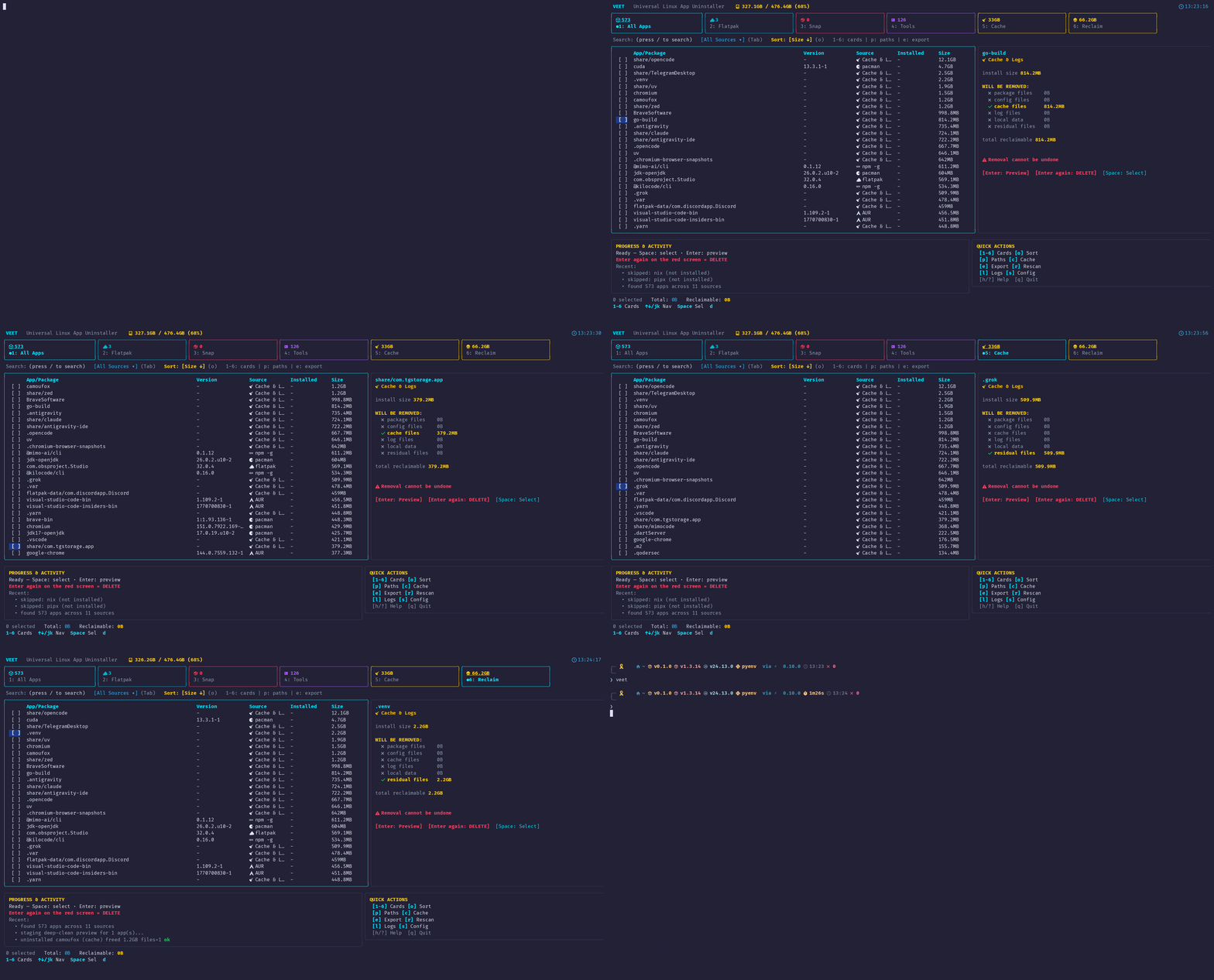
veet closes that gap. It concurrently scans across 17+ sources — native package managers, sandboxed containers, portable bundles, and language toolchains (npm, pipx, cargo, gem, go install) — then stages every candidate residual path for interactive inspection before deleting anything.
Core Capabilities
- 17+ package detectors — pacman/AUR, apt, dnf, zypper, Flatpak, Snap, AppImage, Homebrew, Nix, and language-level installs, queried concurrently.
- Deep residual cleanup — finds and stages leftover configs, caches, and sandboxed app data instead of silently deleting it.
- Streaming scan matrix — a live TUI dashboard with per-detector progress, color-coded status, and a running elapsed timer.
- Orphan & dependency pruning — detects unneeded dependencies via
each package manager's native tooling (
pacman -Qdt,apt autoremove, etc.). - Anti-brick safety — core system components (glibc, kernel, systemd, active shell) are hard-protected from selection, and all elevated operations are batched into a single sudo prompt.
- Advanced search syntax — filter by source (
@flatpak), size (>200M), or protected status directly in the TUI. - 7 built-in themes — Catppuccin, Nord, Dracula, Gruvbox, Tokyo Night, Monokai, and a default cyan palette.
Both a TUI and a Headless CLI
veet launches the full interactive dashboard, while veet scan,
veet clean, veet orphans, and veet cache expose the same
functionality headlessly for scripting and automation, including
--dry-run and --json output modes.
The hard part
- Safe deletion at scale — with 17+ package sources and deep filesystem scanning, the risk of deleting something critical (kernel modules, active shell config, systemd units) required building explicit protected-package safeguards rather than relying on user caution alone.
- Concurrent multi-source scanning — querying that many package managers and directory trees in parallel without janky UI updates meant designing a streaming scan matrix that updates per-detector in real time.
- Minimizing privilege prompts — many of the underlying removal operations need root, but prompting per-file or per-manager is a bad UX; batching everything into a single sudo elevation per transaction took careful staging of the whole delete plan up front.
- Cross-manager consistency — normalizing radically different package
manager outputs (pacman, apt, dnf, Flatpak, Snap, language-level tools)
into one unified data model (
AppInfo) so the UI and CLI could treat them identically.
Outcome
- Shipped as a real, installable tool — available via AUR, a one-line
install script,
go install, and manual build, with CI passing on the repo. - Supports both a full interactive TUI and a scriptable headless CLI
(
scan,clean,orphans,cache,history) from the same codebase. - Outperforms existing tools like BleachBit and native package managers on
coverage — per the README's own comparison matrix, it's the only one
handling sandboxed data (
~/.var/app,~/snap) and orphan pruning together. - Ships with 7 complete theme palettes and full keyboard-driven navigation, polish that's easy to skip in a CLI-first tool.
What I'd do differently
- Building a protected-components registry early (rather than bolting it on later) made the tool trustworthy enough to actually recommend to others for destructive operations.
- Separating the headless CLI subcommands from the TUI, but backing both with the same internal detector/uninstaller engine, avoided duplicating logic and kept scripting and interactive use in sync.
- Structuring detectors as independent, parallel handlers (
internal/detector/) made it straightforward to add new package manager support without touching the core staging/removal engine. - A dry-run mode wasn't optional — for a tool that deletes files across 17+ sources, letting users inspect staged paths before committing was essential for trust, not just a nice-to-have.